🧪 Pricing Experiments
The Pricing Lab lets you test different rates and track whether raising (or lowering) your price actually improves your income — not just your revenue per job.
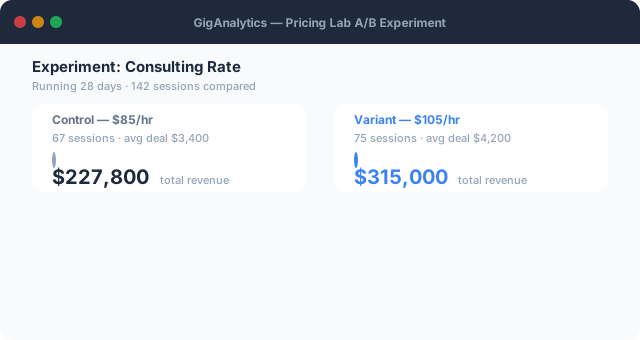
Animated demo — GigAnalytics tracks sessions per rate variant and shows significance as sessions accumulate.
What is a Pricing Experiment?
A pricing experiment records a period during which you charged a specific rate (Variant A) and compares it against another period or rate (Variant B). GigAnalytics tracks:
- Revenue per hour — the primary metric
- Transaction count — volume / conversion proxy
- Total net revenue — absolute income
- Average transaction value — per-job revenue
How to Run a Pricing Experiment
- Go to Pricing Lab in the sidebar.
- Click New Experiment. Give it a name (e.g., "Raise Upwork rate from $85 → $110").
- Select the income stream you're testing, a start date for Variant A, and optionally a switch date to Variant B.
- Import your transactions as usual. GigAnalytics will automatically bin transactions into Variant A or B based on their date.
- After at least 2 weeks of data per variant, open the experiment to see results.
What Is Measured
| Metric | Formula | Why it matters |
|---|---|---|
| Revenue/hour | net_revenue / billable_hours | Primary. Accounts for volume changes. |
| Tx count | COUNT(transactions) | Did volume drop when you raised prices? |
| Avg tx value | net_revenue / tx_count | Higher rate but fewer jobs — is each job worth more? |
| Total net revenue | SUM(net_amount) | Did total income go up or down? |
| Conversion proxy | tx_count / days_in_period | Jobs per day — crude but useful for active platforms. |
Statistical Significance — What We Show
GigAnalytics does not run formal significance tests (t-tests, p-values) on your pricing data. Here's why:
- Freelance income is highly variable and non-normal (a few large jobs dominate)
- Most users have < 50 transactions per variant, making p-values misleading
- External factors (seasonality, platform algorithm changes) confound results
Instead, we show a practical significance estimate:
-- "meaningful" threshold: ≥ 15% change with ≥ 5 transactions per variant
A result flagged as "meaningful" means the difference is large enough to likely matter in practice, not just noise. Always combine this with your own judgment about market conditions.
Pricing Lab Bucket Bars
The Pricing Lab also shows a revenue-per-hour histogram across your transaction history, bucketed by price range. This answers: "At what price point do I earn the most per hour?"
- Buckets are auto-sized to your rate range (e.g., $0–$50, $50–$100, $100+)
- Bar height = revenue per hour for all transactions in that price bucket
- Sweet spot bucket = highest revenue/hour with ≥ 3 transactions
- Bars are highlighted when bucket is the sweet spot
Tips for better experiments
- Run each variant for at least 2–4 weeks before drawing conclusions
- Test one variable at a time (rate only — don't also change your service scope)
- Compare the same platform against itself (don't mix Upwork vs. direct clients)
- Log your time during the experiment period — without time data, revenue/hour can't be computed
- Use the "Notes" field to capture why you ran the experiment